
1.91.0 Release Notes
Release date: 2025-05-22
New Functionality
Affiliate Postback Visibility
Setting postbacks is now fully available in ReferOn. Via the Postbacks menu within the affiliate panel.
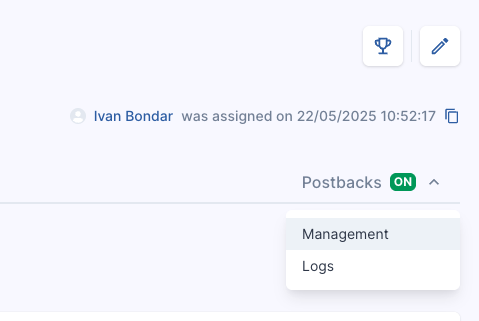
If you do not see this feature, please contact your affiliate manager to enable it for you.
There are 2 main tabs:
- Management
- Logs
Management
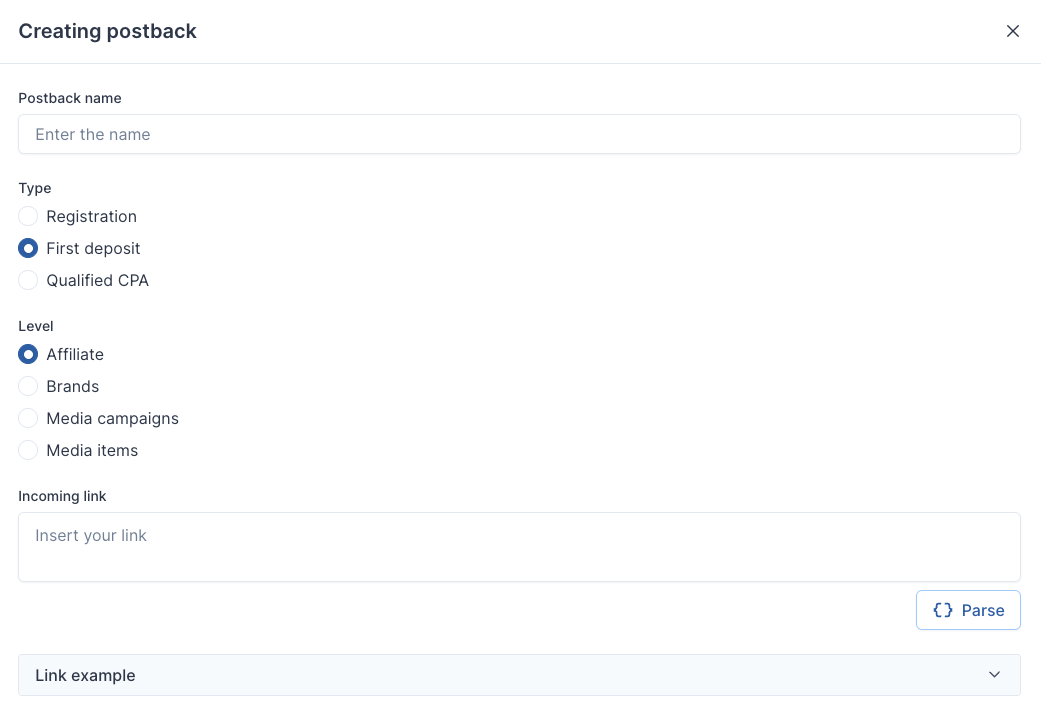
Here is where you can add your Postbacks.

To add your postback, follow the below steps:
- Click Create Postback
- Add Postback Name
- Select the type
- Registration
- First Deposit
- Qualified CPA
Note: Qualified CPA is based on data frequency as it needs to check the reward plan structure and threshold before sending.
- Select the level
- Affiliate
- Brand
- Media Campaigns
- Media Items
This function allows you set different URLs for different levels in your account. Perhaps you have an identifier, such as Event or Campaign ID for a particular tracker.
- Insert the URL
When adding in the URL please follow the below:
- Click Parse
- Click Save Changes
- Repeat for each Type you need.
Logs
When an event occurs, these will then show in the Logs as they happen.

Fixes
- When ordering columns, it was requested that rather than Z-A on first click, it now goes from A-Z on first click.
- USDC ERC20 payment method was no longer valid and USDC TRC20 was added.
- Small bug fixes and UI improvements across the platform.
- when using variables, ensure the tracker variable EQUALS the variable placed here. For example ‘clickid’ and ‘clickid’.
- There are some automatic variables you can pull through, for example
- Event time
- Event Type
- Customer ID
- Affiliate ID
- mid
- brandguid
- fluid
- currency
- variable
to ensure they are picked up, click the edit icon when Pars
- Ensure the value used in the tracker matches with the setup in the postback. For example: ‘clickid’ with ‘clickid’ or ‘subid’ with ‘subid’. If these do not match, the tracked variable will not be captured within the postback.
- If you are adding any automatic values, Referon can cater for some, such as EventTime, Currency, mid, etc. To select the automatic function; parse the URL then edit the variable mapping via the dropdown and then save.